
Git基础命令学习笔记
Git基础命令学习笔记
本文搬运自本人高中时期CSDN博客,若图片加载不出来,可到原文查看:https://blog.csdn.net/zhangtingxiqwq/article/details/161336335
你现在在你的文件夹内打开cmd
开始
1 | git init |
修改
1 | git add . |
在本地随便commit都没有任何问题,不会上传到github,方面本地备份代码。
上传github
-
先在github上建一个仓库
-
第一次推送
1 | git remote add origin 仓库地址 |
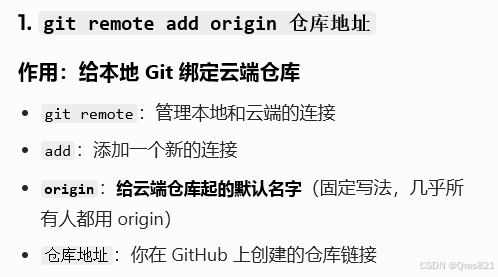
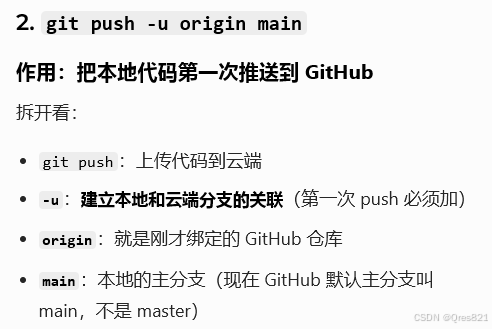
- 之后直接推送:
1 | git push |
Commit相关
查看日志:
1 | git log |
一步add+commit:
1 | git commit -a -m "version2" |
如果说明写错了:
1 | git commit --amend -m "this is the true discription" # 说明写错了 |
回退版本
1 | git reset --soft HEAD^ # 回退到上一个版本 |
但这样子只是让你的head指针回退,你的文件并没有,所以可以采取以下两种办法:
1 | git reset --hard a1b2c3 # 强制回退 |
拉取
这个还没仔细研究过
1 | git pull |
本博客所有文章除特别声明外,均采用 CC BY-NC-SA 4.0 许可协议。转载请注明来源 zhangxixi的博客!
相关推荐
2026-06-28
《具体数学》Lesson 1:Recurrent Problem学习笔记
《具体数学》Lesson 1:Recurrent Problem学习笔记 本文搬运自本人高中时期CSDN博客,若图片加载不出来,可到原文查看:https://blog.csdn.net/zhangtingxiqwq/article/details/162397627 Recurrent Problem 递归问题 Mathematical Induction 数学归纳法 Every recurrence problem can be divided into 3 parts : (1) Research on the small situations (2) Give the rec...
2026-06-19
线性代数学习笔记(第 1 - 5 课)
线性代数学习笔记(第 1 - 5 课) 本文搬运自本人高中时期CSDN博客,若图片加载不出来,可到原文查看:https://blog.csdn.net/zhangtingxiqwq/article/details/162118601 线性代数学习笔记(1-5) 第一课:矩阵运算体系 I 矩阵线性运算 同型矩阵:即行数相同、列数也相同的矩阵 矩阵加 A+B=[a11+b11a12+b12a21+b21a22+b22]A + B = \begin{bmatrix} a_{11}+b_{11} & a_{12}+b_{12} \\ a_{21}+b_{21} & a...

2026-06-19
线性代数学习笔记(第 6- 10 课)
线性代数学习笔记(第 6- 10 课) 本文搬运自本人高中时期CSDN博客,若图片加载不出来,可到原文查看:https://blog.csdn.net/zhangtingxiqwq/article/details/162126613 线性代数学习笔记(6-10课) 第六课:分块矩阵 I 分块运算的规则 分块矩阵 运算规则 加法 乘法 前提: AAA 的列分发和 BBB 的行分法必须完全相同 II 分块对角阵的性质 定义:一个分块矩阵除了主对角线上的子块外,其余所有子块都是零矩阵 形式: 性质: 行列式等于对角块行列式之积 逆矩阵等于对角块逆矩阵的分...
2026-05-01
Git安装记录
Git安装记录 本文搬运自本人高中时期CSDN博客,若图片加载不出来,可到原文查看:https://blog.csdn.net/zhangtingxiqwq/article/details/160683597 尝试安装Git,很顺利,但是中途配置了很多步,都不太懂,基本上是问ai的。现在在这些记录下来,以后想查看我配置的路劲是用。 1 https://git-scm.com/download/win 2 🖱️ 一、Additional icons(额外图标) 12[ ] Additional icons├─ [ ] On the Desktop(桌面快捷方式) 作用 :是否...

2026-05-31
hexo博客上传github page
hexo博客上传github page 本文搬运自本人高中时期CSDN博客,若图片加载不出来,可到原文查看:https://blog.csdn.net/zhangtingxiqwq/article/details/161562364 在github上新建仓库,仓库名必须严格为 用户名.github.io, 并在setting里打开github page的设置 在 _config.yml 加入: 1234deploy: type: git # 部署类型,如 git, heroku 等 repo: https://github.com/2008zhangtx-oss/20...

2023-12-29
12.29听课笔记
12.29听课笔记 本文搬运自本人高中时期CSDN博客,若图片加载不出来,可到原文查看:https://blog.csdn.net/zhangtingxiqwq/article/details/135297427 A 1,n个0,n个1 B -1 放最小 +1 放最大 C 假如根定,可以直接dp 打表得只要根是叶子,答案取最小 直接暴摊也是对的 D 假如定根, DPuDP_uDPu 内部分辨要多少个点。则 DPu=∑DPv−[存在一个儿子为叶子且分支>1]DP_u=\sum DP_v-[存在一个儿子为叶子且分支>1]DPu=∑DPv−[存在一个儿子为叶子且分支&...