加载中...
avatar
文章
744
标签
637
分类
34
Home
Categories
Tags
Archives
About
Statistic
zhangxixi的博客PicGo安装记录 返回首页
搜索
Home
Categories
Tags
Archives
About
Statistic

PicGo安装记录

发表于2026-05-30|软件安装
|总字数:95|阅读时长:1分钟|浏览量:

PicGo安装记录

本文搬运自本人高中时期CSDN博客,若图片加载不出来,可到原文查看:https://blog.csdn.net/zhangtingxiqwq/article/details/161548143

https://github.com/Molunerfinn/PicGo

下载好

然后是配github图床

  1. 先新建一个仓库

  2. 访问 https://github.com/settings/tokens ,新建token,rep项全部选定

  3. 复制走

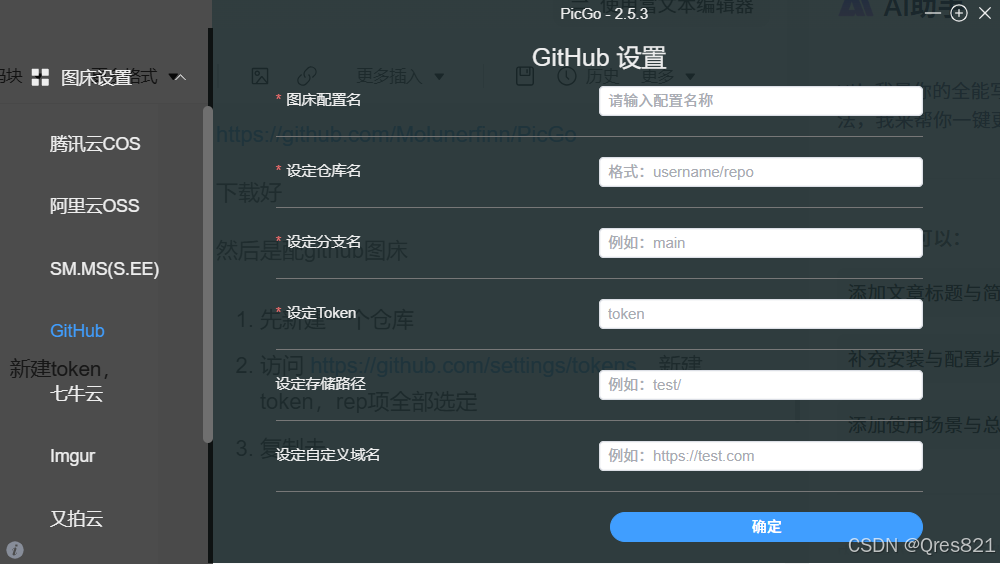
然后这几项老老实实填就好:

在这里插入图片描述

done…

文章作者: zhangxixi
文章链接: http://zhangxixi2008.github.io/post/790c61ee
版权声明: 本博客所有文章除特别声明外,均采用 CC BY-NC-SA 4.0 许可协议。转载请注明来源 zhangxixi的博客!

PicGo图片上传
cover of previous post
上一篇
hexo博客上传github page
hexo博客上传github page 本文搬运自本人高中时期CSDN博客,若图片加载不出来,可到原文查看:https://blog.csdn.net/zhangtingxiqwq/article/details/161562364 在github上新建仓库,仓库名必须严格为 用户名.github.io, 并在setting里打开github page的设置 在 _config.yml 加入: 1234deploy: type: git # 部署类型,如 git, heroku 等 repo: https://github.com/2008zhangtx-oss/20...
cover of next post
下一篇
Hexo博客本地配置
Hexo博客本地配置 本文搬运自本人高中时期CSDN博客,若图片加载不出来,可到原文查看:https://blog.csdn.net/zhangtingxiqwq/article/details/161539158 0. 环境 nodejs git 1. 本地安装 选择一个本地文件夹路劲(不带中文) 右键 open git bash here 输入: 1npm install -g hexo-cli 安装hexo 4. 输入 hexo -v ,查看是否安装成功: 2. 初始化 继续输入: 1hexo init 然后我报错了 换个方法: 在 htt...
相关推荐
cover
2026-06-30
Hexo使用PicGo
首先下载安装配置PicGo:https://blog.csdn.net/zhangtingxiqwq/article/details/161548143 然后打开Typora,进行配置: 测试成功: PicGo可打开以下设置: 因为如果开机不自启Typora复制时就用不了了 关于图片压缩: 可以在Typora选择:插入时自动转义图片URL
目录
  1. 1. PicGo安装记录
© 2025 - 2026 By zhangxixi框架 Hexo 8.1.2|主题 Butterfly 5.5.5-b1
你的未来定闪闪发光、光芒万丈!
搜索
数据加载中